
假期即将结束,你的手指已经迫不及待地想要构建一些比上次更酷的东西。
我们今天要介绍的这些仓库,展示了一组真正适合动手实验的 skills,同时也能让你清晰了解当下 agentic software 的构建方式。
我们将探索 research workflows、代码库理解、memory、design constraints、validation loops 和 shipping tools,这些组件教会 agent 的不仅是 *要做什么*,还包括 *如何工作*。
设计良好的 skill 会把 agent 原本需要临时发挥的流程封装起来,而仅这一点就足以消除一整类重复性工作。
这就是为什么下面这 20 个 skills 能够组成一个出人意料地连贯的闭环:
发现问题。梳理系统。构建成果。检查结果。发布下一个版本!
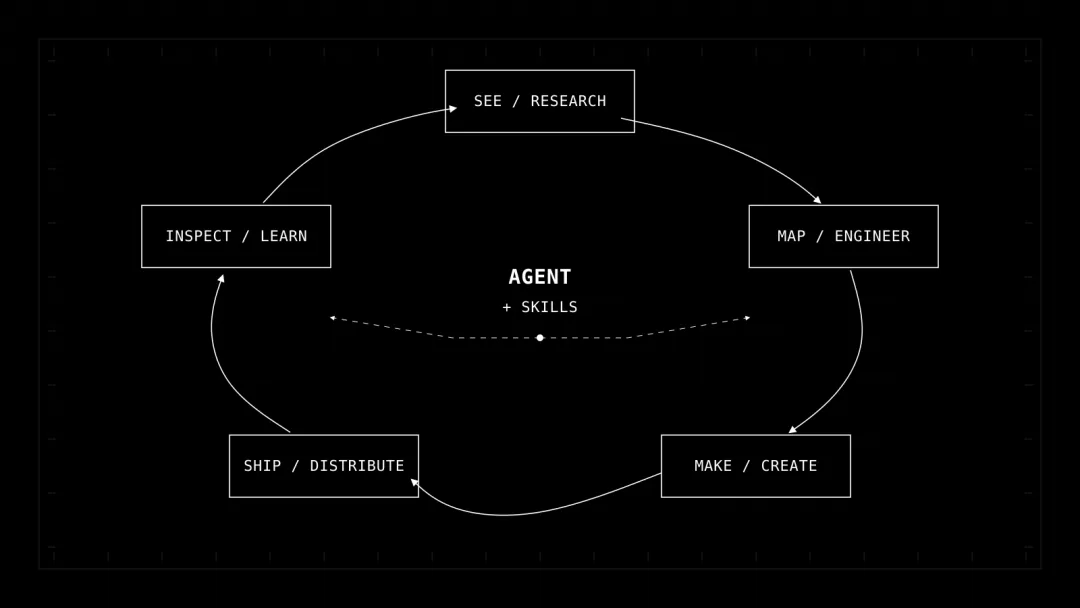
技术栈
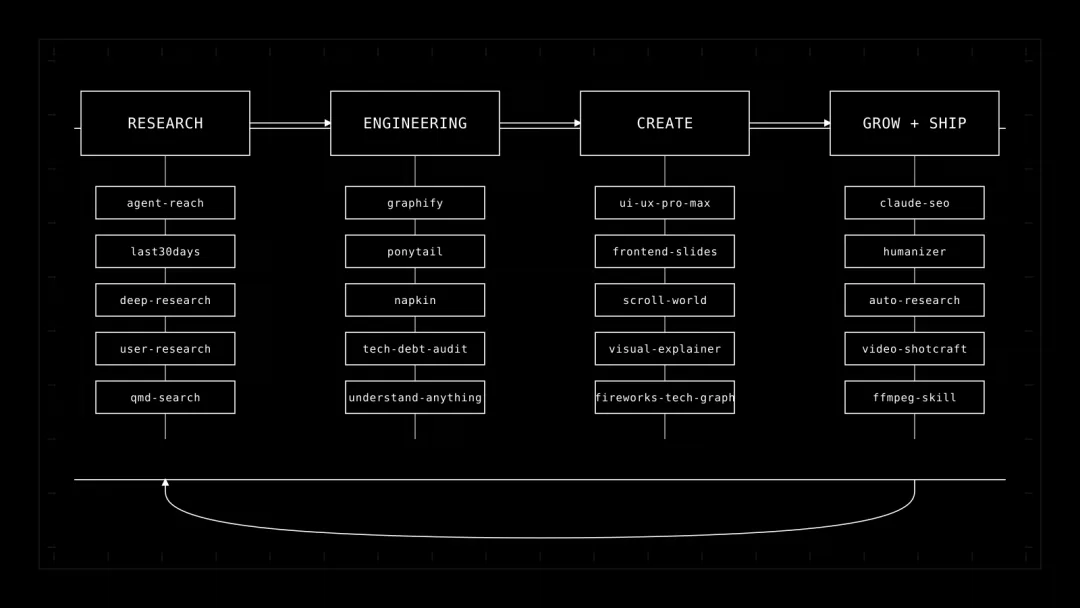
在深入细节之前,我想先分享完整列表。这些 skills 按层级分组,括号内是截至本文撰写时约略的 GitHub star 数量。
Research
agent-reach (85.0K):通过路由访问 web、social 和 repo
last30days (62.7K):近期多源 research
deep-research (1.1K):带 source validation 的结构化 research
user-research (1.6K):定性和定量 user research
qmd-search (700):快速 Markdown search
Engineering
graphify (120.7K):可查询的 code 和 document knowledge graph
ponytail (144.7K):simplicity 和 YAGNI decision discipline
napkin (612):按 repo 保存 mistakes 和 corrections 的 memory
tech-debt-audit (610):逐文件引用的 technical debt audit
understand-anything (83.8K):交互式 codebase knowledge graph
Create
ui-ux-pro-max (130.0K):UI 和 UX design intelligence
frontend-slides (29.7K):web-native slide generation
scroll-world (9.4K):scroll-scrubbed 3D landing pages
visual-explainer (9.9K):HTML diagrams、diff reviews 和 plan reviews
fireworks-tech-graph (11.5K):SVG 和 PNG technical diagrams
Grow + Ship
claude-seo (17.5K):technical SEO、GEO 和 AEO workflows
humanizer (51.5K):针对 AI-shaped prose 的 editing pass
auto-research-in-sleep (16.6K):autonomous research 和 review loops
video-shotcraft (9.3K):product-video shot recipes 加上 Remotion
ffmpeg-skill (1.4K):local video editing 和 verification
没人需要一次性安装全部 20 个。
真正有用的做法,是找到当前 agent 所面对的工作中缺失的那一层,然后只添加对应的 skill。
下面逐一介绍。
Research:先让 agent 看见,再让它做决定
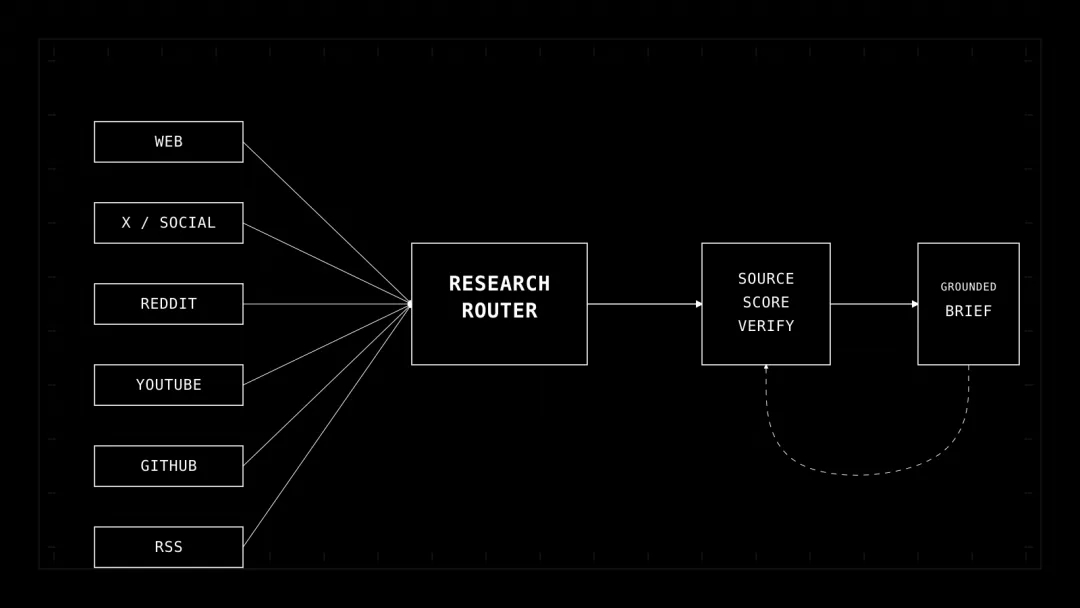
agentic systems 最常见的失败很容易发现:agent 在不完整的上下文上自信地进行推理。
Agent Reach 将 internet access 视为一个 capability layer,也就是通过路由访问 web pages、YouTube、GitHub、RSS、X、Reddit 和其他来源;此外还提供 doctor command,用于报告实际配置并正常工作的内容。
它的 install flow 是围绕 agent 设计的。
你只需要把安装说明交给 agent,让它自行配置这一 capability:
Help me install Agent Reach:
https://raw.githubusercontent.com/Panniantong/agent-reach/main/docs/install.md
然后在信任它之前先检查 environment:
agent-reach doctor
对于有时间范围限制的 research,last30days 的约束更强。
它会跨多个来源研究近期讨论,并且可以安装到许多兼容 skills 的 hosts 上:
npx skills add mvanhorn/last30days-skill -g
它还提供 preflight mode,因此你可以在 research run 开始前检查计划中的读取和写入操作:
python3 skills/last30days/scripts/last30days.py --preflight
对于更深入、以 citations 为依据的工作,deep-research 的安装几乎简单得有些夸张:
git clone https://github.com/199-biotechnologies/claude-deep-research-skill.git \
~/.claude/skills/deep-research
基本路径不需要 orchestration framework,整个 workflow 都包含在这个 skill 中。
Research layer 中普遍存在这样一种模式:每个 skill 都会在 agent 开始综合信息之前,强制执行一套可重复的 evidence-gathering procedure。
Engineering:在修改系统之前先理解它
这正是整个 stack 变得更有意思的地方。
coding agent 已经可以对 repository 执行 grep。仅靠 grep 无法告诉它系统架构、依赖影响、历史错误,或者哪些东西不应该构建。
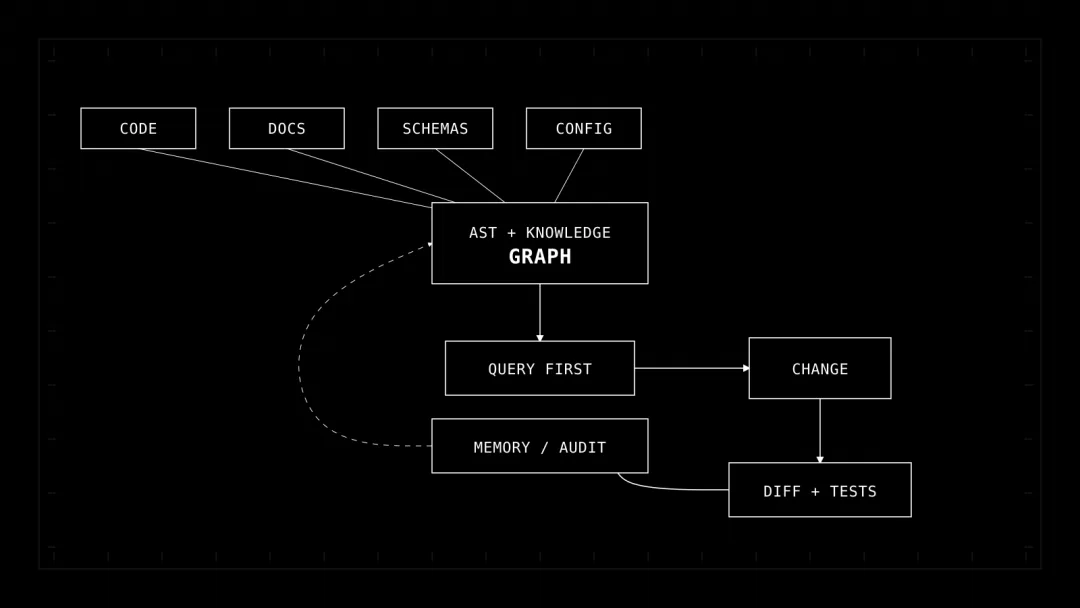
Graphify 会将 code、docs、schemas、configs 和其他 artifacts 转换为可查询的 graph。你可以在这里阅读深度解析:
>
> Your Coding Agent Should Map the Repo Once, Not Grep It Forever
>
该项目支持多个 agent platforms,并且可以安装 project-local guidance:
uv tool install graphifyy
graphify install --project --strict
从 systems perspective 来看,strict mode 是其中最有意思的部分。
它可以将 agent 重定向为:在读取 raw source files 之前先查询 graph。
这是一个很小的 control-plane 决策,却会产生很大的 behavioral effect,因为 context acquisition 变成了一个明确且有意识的步骤。
Understand Anything 通过 multi-agent analysis pipeline 和 interactive dashboard,将类似的理念进一步推进:
/plugin marketplace add Egonex-AI/Understand-Anything
/plugin install understand-anything
/understand
/understand-dashboard
生成的 graph 可以通过增量方式保持最新,repo 还提供了 /understand-diff 和 /understand-explain 等 commands,用于 impact analysis 和 focused exploration。
接下来是两个规模小得多、但职责截然不同的 skills。
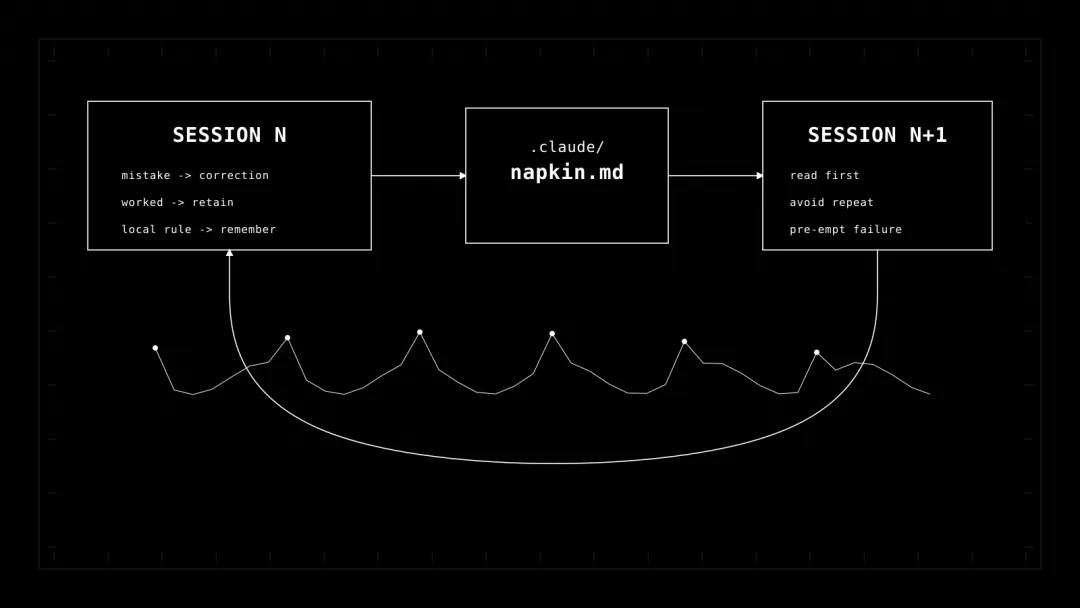
Napkin 会为每个 repository 维护一个 Markdown scratchpad,用来记录 mistakes、corrections 以及有效的方法:
git clone https://github.com/blader/napkin.git ~/.claude/skills/napkin
这是 primitive memory,而 primitive 经常被低估。
持久化的 .claude/napkin.md 文件可以阻止 agent 在多个 sessions 中重复同一个本地错误。
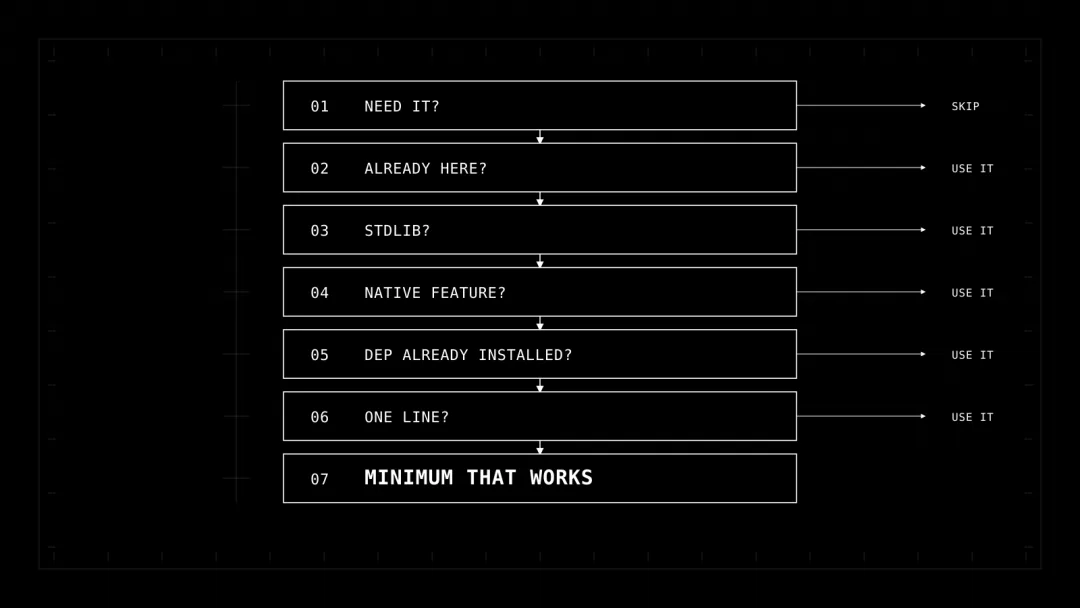
Ponytail 针对的是另一种 coding-agent pathology:过度构建。
它的 decision ladder 基本上是将 senior engineer 的懒惰编码成可复用的 policy:
1. Does this need to exist?
2. Is it already in the codebase?
3. Can the standard library do it?
4. Is there a native platform feature?
5. Is the dependency already installed?
6. Can it be one line?
7. Only then: write the minimum that works.
这套 ladder 会在 agent 理解问题 *之后* 生效,其全部目的就是避免不必要的 surface area 进入 codebase。
最后,tech-debt-audit 为你提供可重复执行的 whole-repo audit,以及持久化的 TECH_DEBT_AUDIT.md artifact。
它甚至要求增加一个专门记录“看起来很糟糕但实际上没问题”的部分,这对于防止由 checklist 驱动的 refactoring 很有帮助。
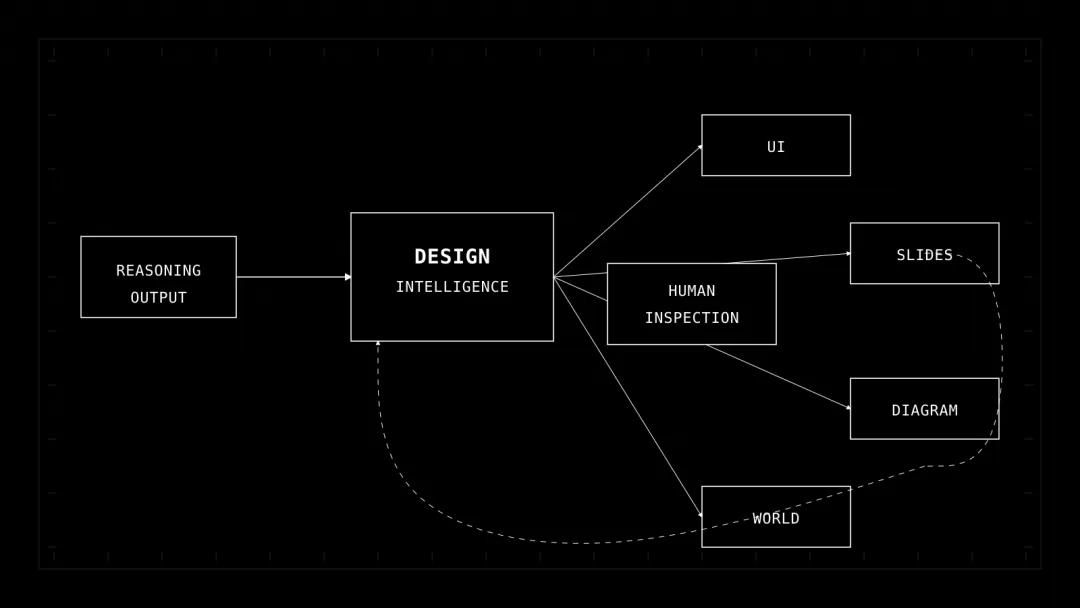
Create:将推理转化为人类可以检查的成果
Agent output 往往在技术上是正确的,但仍然无法使用,因为缺少最后一公里。
Create layer 会将内部 reasoning 转化为人们能够实际评估的 interfaces、diagrams、slides 和 media。
ui-ux-pro-max 将可搜索的 style guidance、product patterns 和针对特定 stack 的 UI recommendations 封装在一起。
它的 CLI 可以针对许多 assistants 完成安装:
npm install -g ui-ux-pro-max-cli
uipro init --ai universal
当 terminal output 成为瓶颈时,visual-explainer 就体现出了它的价值。
它会将 architecture explanations、diff reviews 和 plan reviews 转换为 self-contained HTML:
/plugin marketplace add nicobailon/visual-explainer
/plugin install visual-explainer@visual-explainer-marketplace
然后你可以提出类似这样的请求:
draw a diagram of our authentication flow
/diff-review
/plan-review ~/docs/refactor-plan.md
fireworks-tech-graph 的范围更窄,也更加严谨。
它会依据明确的 geometry 和 validation rules 生成 SVG 和 PNG technical diagrams。
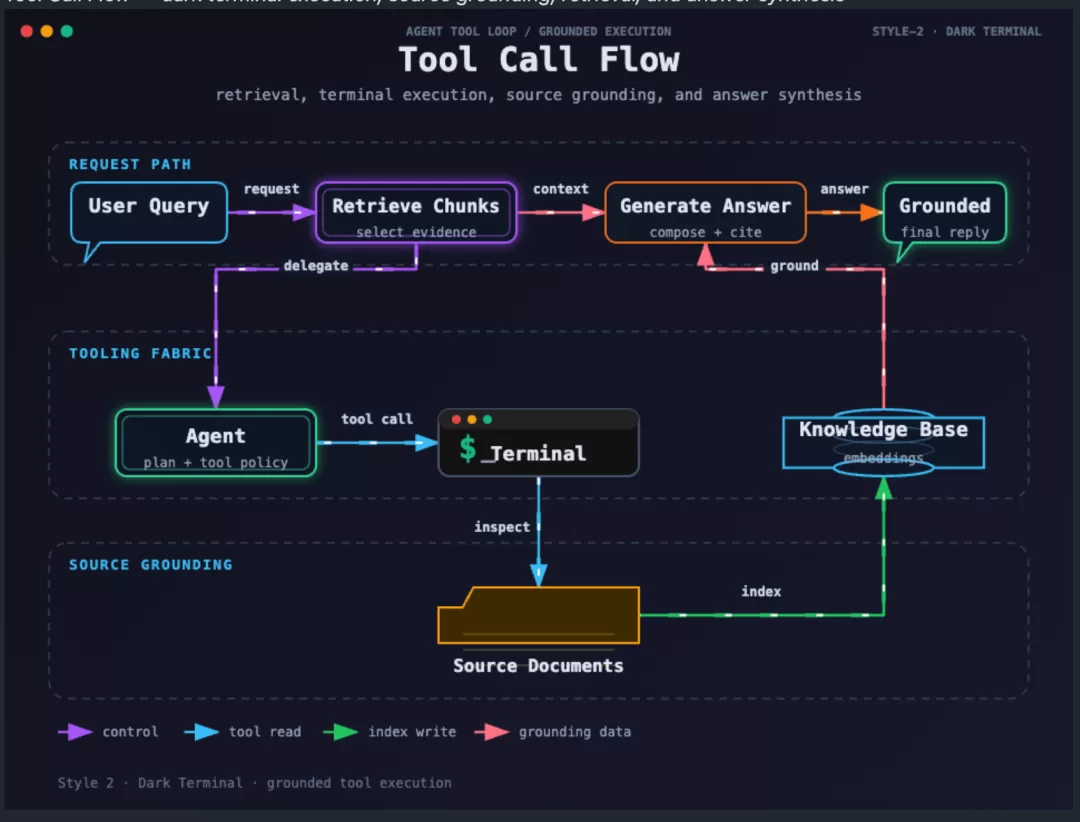
它最突出的特性是一组 composition contracts:spacing、routing、crossings、bend limits 和 semantic constraints 都会作为 workflow 的一部分接受检查。
这就是 agentic creation 应有的样子:generation 与 machine-checkable quality gates 配对执行。
Grow + Ship:distribution 也是 agent loop 的一部分
代码编译完成之后,成果仍然需要触达用户。
claude-seo 将 SEO 转换为明确的 commands:
/seo audit https://example.com
/seo page https://example.com/about
/seo schema https://example.com
Humanizer 可以在 content generation 之后作为 editing pass 使用:
npx skills add blader/humanizer --global
对于 video,video-shotcraft 为 agent 提供了 shot recipes library、motion previews 以及面向 Remotion 的 production workflow:
npx skills add Vincentwei1021/video-shotcraft
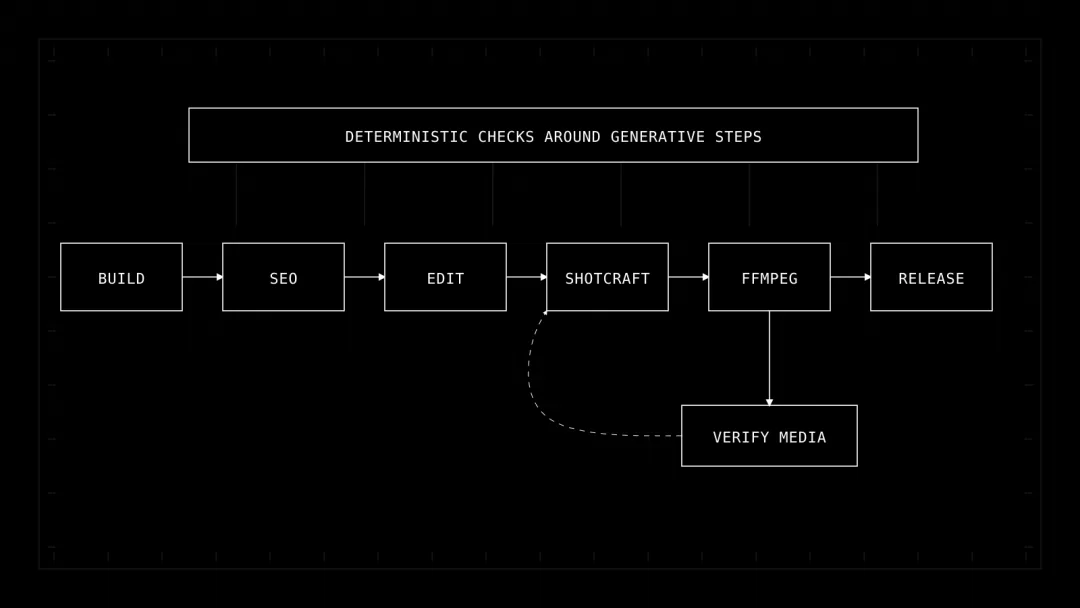
然后,ffmpeg-skill 负责 deterministic local execution layer:
npx ffmpeg-skill --project
npx ffmpeg-skill doctor
npx ffmpeg-skill contract --json | head -40
我非常喜欢这种分离方式。
Creative skill 决定 edit 应该 *是什么*,而 deterministic media skill 执行 edit 并对其进行验证。
Planner 和 tool 不需要是同一个东西。
实用的快速入门:每一层选择一个 capability
如果我在一个真实的 engineering team 中测试这个 stack,我会跳过 20 个 global installs,先从四个 project-scoped capabilities 开始:
Research
npx skills add mvanhorn/last30days-skill
Engineering context
uv tool install graphifyy
graphify install --project --strict
Creation
npm install -g ui-ux-pro-max-cli
uipro init --ai universal
Shipping / media verification
npx ffmpeg-skill --project
npx ffmpeg-skill doctor
团队遇到真实 failure cases 后,再添加 memory 和 audit behavior:
git clone https://github.com/blader/napkin.git ~/.claude/skills/napkin
mkdir -p .claude/skills/tech-debt-audit
curl -o .claude/skills/tech-debt-audit/SKILL.md \
https://raw.githubusercontent.com/ksimback/tech-debt-skill/main/SKILL.md
一个现实中的 workflow 大致如下:
1. Research the problem and current evidence.
2. Build or query a map of the codebase.
3. Ask the agent for the smallest viable change.
4. Implement.
5. Run tests and inspect the diff.
6. Persist corrections and mistakes.
7. Generate the human-facing explanation or artifact.
8. Run distribution, SEO and media checks.
9. Ship.
10. Feed the observed result into the next run.
这比单纯赋予 agent 更多 autonomy,是更有用的 mental model。
其余 skills 填补了各阶段之间的空隙
其中有五个 repositories 很容易被低估,因为它们解决的是范围更窄的 transition problems。
user-research 通过封装 interview、survey 和 synthesis workflows,将 research 从“internet 怎么说?”推进到“users 怎么说?”
qmd-search 位于 spectrum 的另一端:它是围绕 Quick Markdown Search 的一个小型 skill definition。当 agent 已经积累了本地 notes、需要快速检索这些 notes,又不想再执行一次 web search 时,它会很有帮助。
在 creation 方面,frontend-slides 输出 single-file web presentations,而 scroll-world 面向一种非常具体的 interface pattern:continuous scroll-driven 3D landing experience。两者都为一种特定类型的 output 编码了完整的 *production grammar*。
auto-research-in-sleep 则是最明确的闭环示例。它以 Markdown-only workflows 的形式,将 research、review、experiments 和 cross-model critique 组织为可重复的 stages。该 repo 甚至将 harness optimization 与 research output 分离开来,这是正确的区分:你可以调优产生工作的 system,而不会在不知不觉中重写工作本身。
每个 skill 都应该有清晰的 input、边界明确的 job,以及下一个 skill 可以使用的可检查 output。
像管理代码一样管理 skills
这里有一个 caveat。
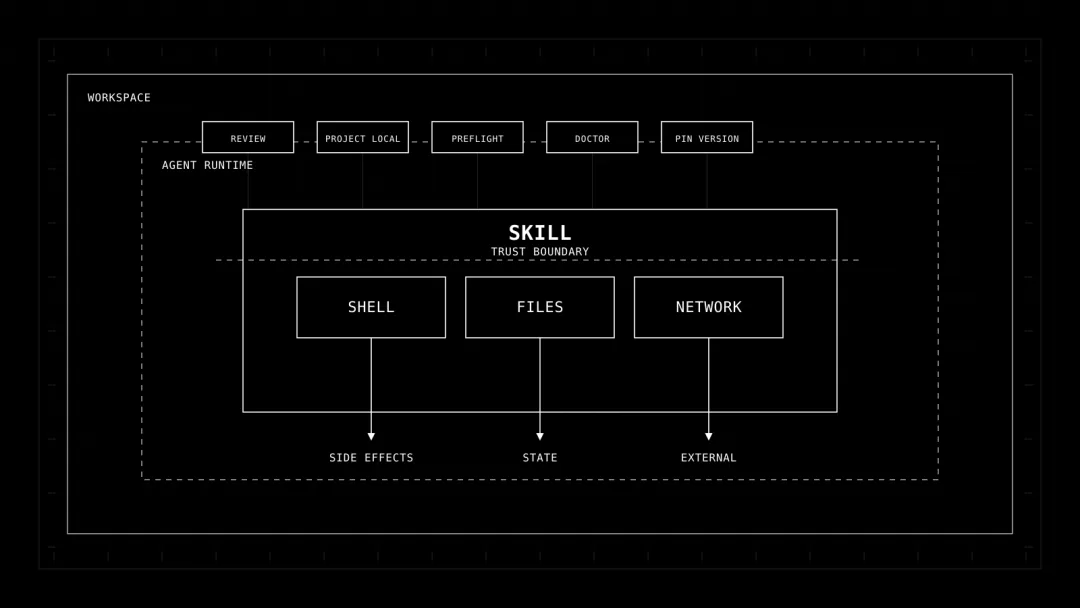
许多 skills 可以执行 shell commands、读取 local files、调用 network services、复用 browser sessions、写入 artifacts 或安装 dependencies。
SKILL.md 文件看起来像 documentation,但从 operational 角度看,它可能成为 execution policy 的一部分。
因此,我会像管理 dependencies 一样管理 skills:
优先进行 project-local installation;
为 production workflows 固定版本;
在授予 tool access 之前检查 skill 及其 install scripts;
将 read-only research skills 与具备 mutation 能力的 skills 分离;
在可用时运行 doctor、preflight 或 contract commands;
记录 skill 可以触及哪些 files、network calls 和 credentials;
尽可能将 deterministic verification 放在 generative step 之外。
这也是 small、focused skills 具有吸引力的原因。
你可以分析一个只做一件事的 skill,但一个巨大的 autonomous employee prompt 则很难测试、观察或撤销。
Bonus Articles
Self-Improving Coding Agents Just Got Much Cheaper
Your Coding Agent Should Map the Repo Once, Not Grep It Forever
What Happens When Agent Debugs Its Own Harness?
Memory System Behind $10B Invite-Only Personal Agent
SELF-INDEX: Self-Evolving Search Index for Retrieval-Augmented Agents