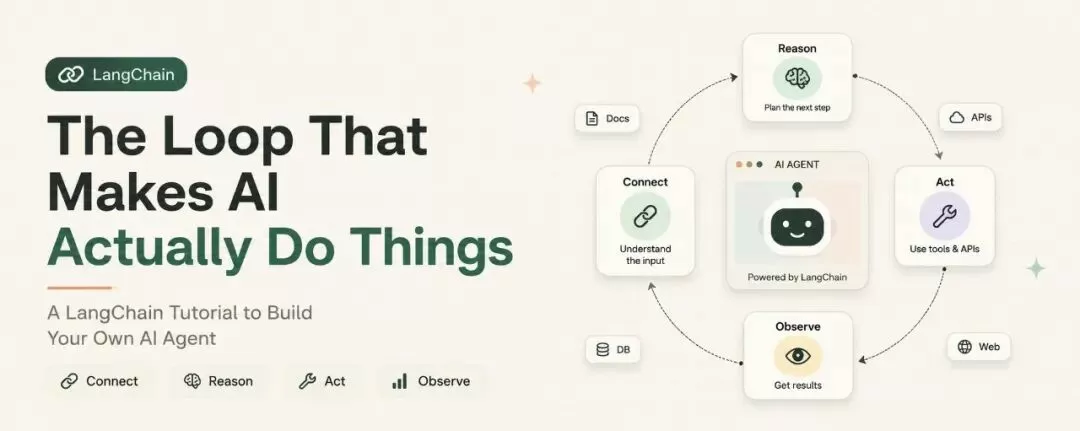
你肯定看过各种演示:能根据文档回答问题的聊天机器人、能浏览网页给你发摘要的 Agent、能把原始文本转成指定 JSON 格式的流水线。这些全都是用 LangChain 做的,看起来好像不难,但是真的不难吗?
你去 GitHub 下载了 Agent 代码,在本地跑通了。然后你想在此基础上自己搞点事情,结果撞上了墙:概念太多、节奏太快、顺序不对。什么是链?什么是消息类型?为什么工具需要 Schema?Agent 什么时候真的需要工具循环?
这篇文章按正确顺序解答了这些问题
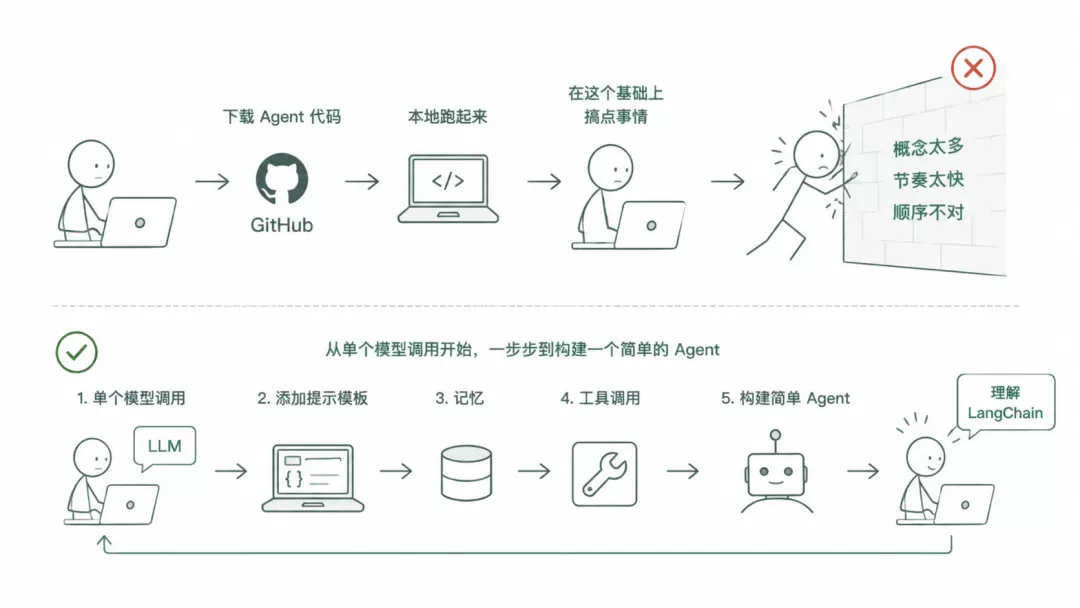
。从单个模型调用开始,一步步到可运行的 Agent。你会理解 LangChain 背后的思维模型,而不只是记住语法。
LangChain 是什么?
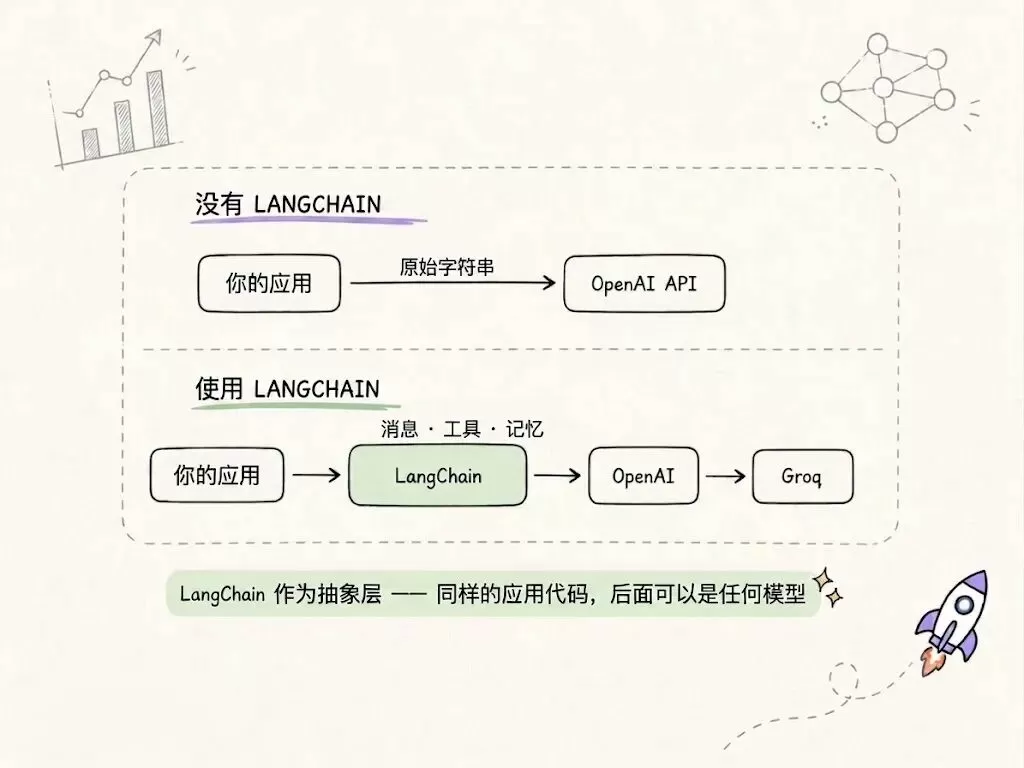
LangChain 官方定义是:"构建基于语言模型的应用程序框架。"但这个定义掩盖了它真正的含义。真正的含义是:语言模型本身就是一个函数。你输入文本,它输出文本。它是无状态的,它不记得你之前说过什么,不知道怎么搜索网页,不能运行 Python,只是生成 token。
LangChain 给你一套标准方式:传递消息、连接工具、维护状态、把输出串成下一个输入。它可以通过同一个接口对接 OpenAI、Anthropic、Groq、Hugging Face 等任何模型。
还有一件事值得知道:LangChain v1 在 2025 年初发布,清理了 v0 版本中很多乱糟糟的 API。导入方式有所不同,Agent API 也变了。这篇文章全程用 v1。
import langchain
print(langchain.__version__)
# Should be 1.x.x
第一次模型调用
在搞 Agent、搞工具或者搞任何东西之前,你得先知道怎么跟模型对话。这里是第一步:
import os
from dotenv import load_dotenv
from langchain.chat_models import init_chat_model

load_dotenv()

# Works with OpenAI, Anthropic, Groq — same interface
model = init_chat_model("groq:llama-3.1-8b-instant")

response = model.invoke("Explain what a REST API is in two sentences.")
print(response.content)就是这样。init_chat_model 接受一个带提供商前缀的字符串,比如 "groq:llama-3.1-8b-instant" 或 "openai:gpt-4o",不管底层提供商是谁,它返回给你一个接口相同的模型对象。
响应是一个 AIMessage 对象。.content 属性包含文本内容。如果你想查看响应元数据(token 计数、模型名称、延迟),你可以在 .response_metadata 里查看到。
消息:对话历史就是记忆
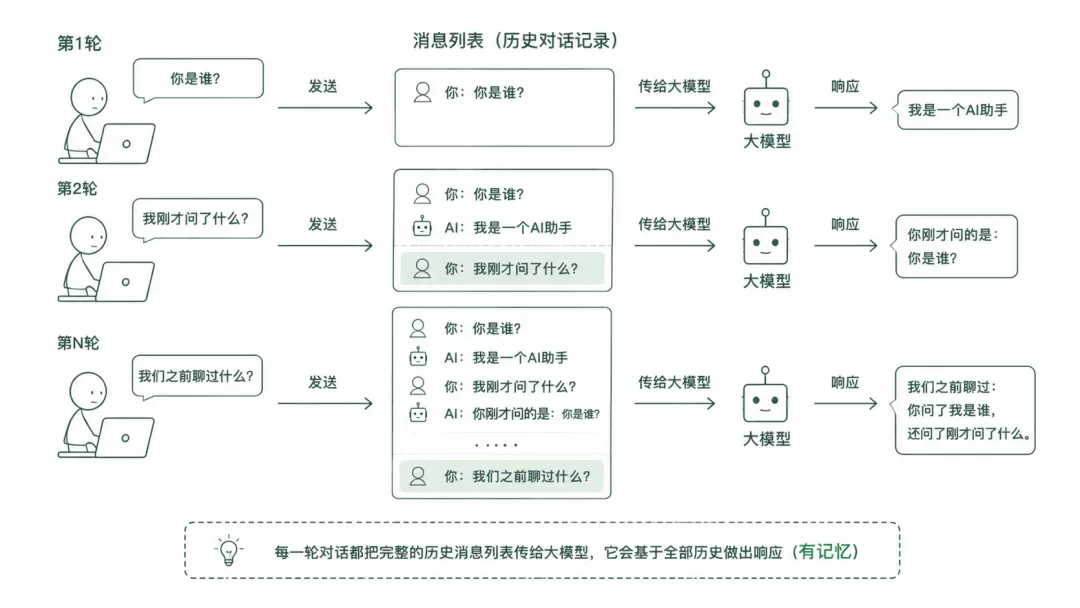
当你调用 model.invoke("some text") 时,LangChain 在底层把你的字符串包装成一个 HumanMessage 对象。你需要了解 LangChain 里的四种消息类型,这是大模型处理的基本单元:
SystemMessage:系统提示,告诉模型该做什么HumanMessage:用户输入AIMessage:模型回复ToolMessage:工具返回结果
模型本身没有记忆。每次调用 invoke(),你都从头发送完整历史。这个消息列表就是内存。保存它、扩展它,模型就能保持在上下文中。
from langchain_core.messages import SystemMessage, HumanMessage, AIMessage

# Build the conversation manually
conversation = [
    SystemMessage("You are a concise Python tutor. Keep answers short."),
    HumanMessage("What is a list comprehension?")
]

response = model.invoke(conversation)
print(response.content)

# Continue the conversation — append both messages
conversation.append(response)
conversation.append(HumanMessage("Give me a quick example."))
followup = model.invoke(conversation)
print(followup.content)
工具:让模型能做事
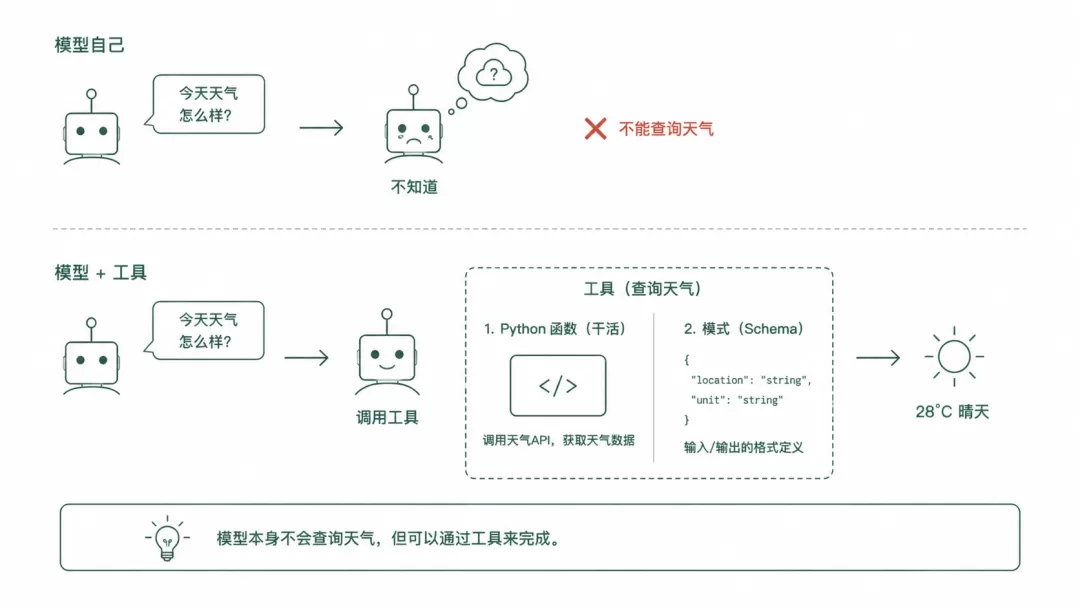
只训练文本的语言模型,查不了今天的股价,看不了你的数据库,发不了邮件。工具解决了这个问题。一个工具其实包含两部分:一个是干活的 Python 函数,另一个是模式(schema),它告诉模型这个函数是做什么的、接受哪些参数。
LangChain 用 @tool 装饰器让定义工具变得简单。函数的 docstring 就是模型读的描述,类型注解就是参数 schema。
from langchain.tools import tool

@tool
def get_stock_price(ticker: str) -> str:
    """Get the current stock price for a given ticker symbol."""
    prices = {"AAPL": "$192.45", "TSLA": "$248.10", "NVDA": "$875.30"}
    return prices.get(ticker.upper(), f"No price found for {ticker}")

@tool
def get_weather(city: str) -> str:
    """Get current weather conditions for a city."""
    return f"It's 22°C and partly cloudy in {city}."

# Bind the tools to the model
model_with_tools = model.bind_tools([get_stock_price, get_weather])
这里有个很多人会漏掉的点:绑定工具并不会让模型自动使用它们。模型返回一个结构化的 AIMessage,你还是得自己执行它。完整调用流程三步:
# Step 1: Send user question — model decides what to call
messages = [{"role": "user", "content": "What's the AAPL stock price?"}]
ai_msg = model_with_tools.invoke(messages)
messages.append(ai_msg)

# Step 2: Execute whatever tools the model requested
tools_map = {"get_stock_price": get_stock_price, "get_weather": get_weather}
for tool_call in ai_msg.tool_calls:
    print(f"Model wants: {tool_call['name']}({tool_call['args']})")
    result = tools_map[tool_call['name']].invoke(tool_call['args'])
    messages.append(result)

# Step 3: Pass results back — model uses them in its final answer
final = model_with_tools.invoke(messages)
print(final.content)
结构化输出
假设你想让模型从文本中提取信息,并返回一个 Python 对象。你可以要求大模型"返回 JSON",然后自己解析字符串,或者你可以用结构化输出,这样会更好点。给你想要的东西定义一个 Pydantic 模型,剩下的 LangChain 搞定。
from pydantic import BaseModel, Field
from typing import List

class JobPosting(BaseModel):
    role: str = Field(description="Job title")
    company: str = Field(description="Company name")
    required_skills: List[str] = Field(description="List of required skills")
    remote: bool = Field(description="Whether the role is remote")

# Wrap the model — it will always return a JobPosting object
structured_model = model.with_structured_output(JobPosting)

job_text = """Senior ML Engineer at DataCorp. Must know Python, PyTorch, and MLflow. Fully remote position."""
posting = structured_model.invoke(job_text)
print(posting.role)  # → "Senior ML Engineer"
返回的是真正的 Python 对象,不是字符串。属性访问、类型安全、验证,这些全都是通过 Pydantic 内置的。
构建真正的 Agent
Agent 就是循环中的模型。它接收任务、思考该做什么、需要的话调用工具、接收结果,然后决定要不要再调用一个工具还是直接回答,它一直重复直到完成。这个循环就是:思考→行动→观察→重复。这就是 Agent 和单次模型调用的区别。
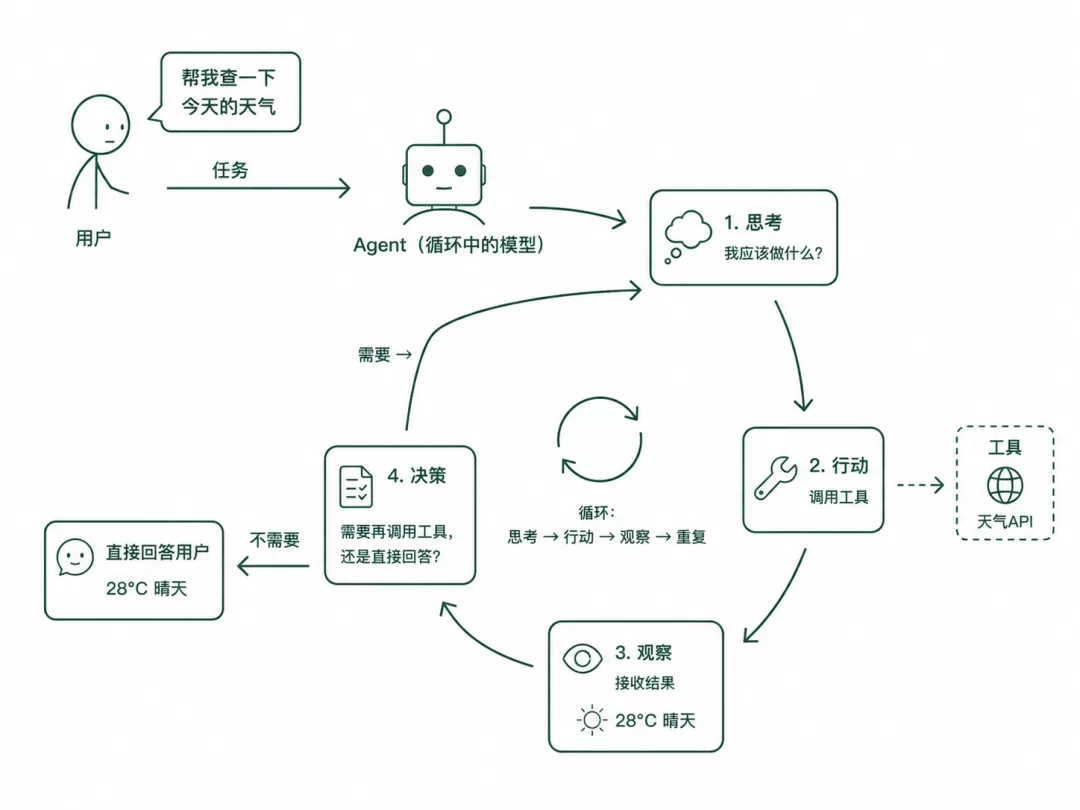
LangChain v1 底层用 create_react_agent,它帮你实现了这个循环。下面是一个完整可运行的 Agent:
from langchain.agents import create_react_agent, AgentExecutor
from langchain.tools import tool
from langchain_core.prompts import ChatPromptTemplate

@tool
def search_docs(query: str) -> str:
    """Search internal documentation for answers."""
    return f"Found 3 results for '{query}'. Top result: ..."

@tool
def get_user_info(user_id: str) -> str:
    """Look up account information for a user ID."""
    return f"User {user_id}: Plan=Pro, Joined=2024-01, Status=Active"

tools = [search_docs, get_user_info]

prompt = ChatPromptTemplate.from_messages([
    ("system", "You are a helpful support agent. Use the tools available to answer user questions accurately."),
    ("human", "{input}"),
    ("placeholder", "{agent_scratchpad}"),
])

agent = create_react_agent(model, tools, prompt)
executor = AgentExecutor(agent=agent, tools=tools, verbose=True)

result = executor.invoke({"input": "What plan is user U-9821 on?"})
print(result["output"])
verbose=True 标志会在运行时打印完整的循环信息:调用了哪个工具、用了哪些参数、返回了什么。先开着 verbose 运行一次,你就能准确看到 Agent 是怎么一步步解决问题的。
四层思维模型
这篇文章把所有东西串起来的思维模型其实很简单:
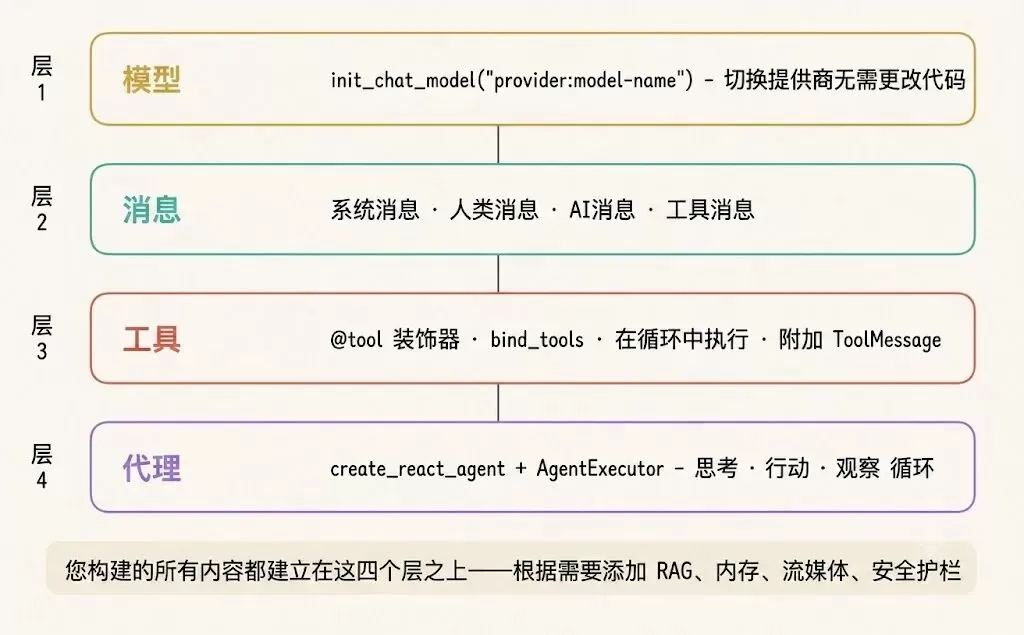
- 模型层:理解处理消息、执行函数
- 消息层:四种消息类型,对话历史就是记忆
- 工具层:带 schema 的函数,模型能调用外部能力
- Agent 层:ReAct 循环——思考→行动→观察→重复直到完成
其实不一定非得把四层全用上。比如只做数据提取,用模型和结构化输出就行。做个文档问答机器人,那需要消息和搜索工具。如果是自动应答的客服机器人,那四层都得要。你就看自己任务需要哪几层,从最少的开始用。
总结
好多人一上来就冲着 Agent 去了,结果被各种抽象概念绕晕了。理解了四层模型:模型、消息、工具、结构化输出、Agent,以及它们之间怎么串起来的,再去看 LangChain 的代码,就不会那么迷茫了。
完整代码在这里:https://github.com/Ramakm/ai-agents